
Skip to content
AI Copilot

Ask your revenue cycle a question. Get an answer you can check.

Your team already knows what they want to know — which claims are worth working, why a payer keeps denying, where the money is sitting. The Copilot answers in plain English from your own claims and remittances, and shows you the records behind every figure.
  • Answers from your own data
  • Sources on every answer
  • Read-only by design
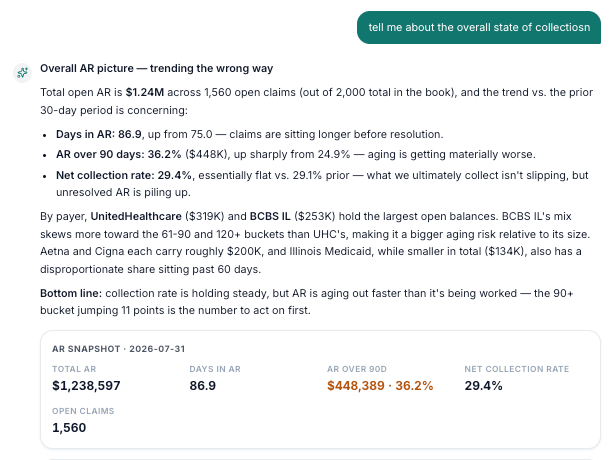
AI Copilot answering a question about the overall state of collections with an A/R snapshot: $1.24M total A/R, 86.9 days in A/R, and 36.2% over 90 days.

A question about the overall state of collections, answered with a summary card drawn from live records rather than a wall of text.

What it does

Finds the claim you mean

Describe it however you think of it — a claim number, a patient, a procedure code, a payer, a denial reason — and go straight to the summary, timeline or remittance.

Explains denials and appeals

Why a claim was denied, whether it is worth appealing, how a payer tends to behave, and which appeal windows are about to close.

Answers questions about the book

A/R totals, aging by payer, your most common denial reasons, contract shortfalls and queue health — without opening five reports.

Explores without a report request

Cut the book the way you need it in the moment. Nobody writes a query, and nobody waits on an analyst for a one-off question.

How it works

  1. 1

    Ask in plain English

    No query language, no filters to configure. Ask the way you would ask a senior biller sitting next to you.

  2. 2

    It reads your records

    The answer is drawn from the same claims, remittances and contracts your team works from — not from a stale extract.

  3. 3

    You get something you can check

    Answers come back as summaries and tables with the underlying records linked, so nothing has to be taken on trust.

  4. 4

    You go straight to the work

    Each answer offers a direct route into the screen where the next step actually happens.

An answer you cannot verify is worse than none

The reason teams stop trusting an AI assistant is a single confident, wrong number. So this one is built to be checked: figures come out of your records, and the records come with them.

  • Every answer carries links to the claims, remittances and contracts it was built from.
  • Open any figure and you land on the record it came from, in the product, not in a report.
  • When a list is longer than what is shown, it says so rather than quietly truncating.
  • General coding guidance is marked as guidance and points you to the payer's own policy and the official references.

Questions people actually ask

  • “What should I work first today?”
  • “Which appeal windows close in the next 14 days?”
  • “Where are we being underpaid against contract?”
  • “How does this payer behave — denial rate, days to pay?”
  • “Why was this claim denied?”
  • “What is sitting unassigned?”

Answers arrive as work, not prose

A paragraph is hard to act on. The Copilot replies with the same kind of cards and tables your team already reads elsewhere in the product, so an answer is something you can scan, sort and click into.

  • A/R snapshots covering total receivable, days in A/R, the share over ninety days and collection rate.
  • Denial breakdowns, aging by payer, contract shortfalls and claims held before submission.
  • Claim summaries, remittance detail, coverage and the full activity trail on a single claim.
  • An explanation of why a specific claim is ranked where it is on the worklist.

What comes back

  • Summary cards

    The headline numbers, with the period they cover stated.

  • Sortable tables

    Denials, appeals, aging and tasks you can order and open.

  • Claim detail

    Balances, status, deadlines and what happened when.

  • Recommended next step

    What to do, why, and a link to where you do it.

It surfaces; your team decides

The Copilot is read-only on purpose. Ask it to post a note, reassign a claim or file an appeal and it will explain the step and take you to the right screen — but a person completes the action, and the audit trail stays human.

  • No writes, no silent changes, no automated actions taken on your behalf.
  • It works from the same numbers as your dashboards, so the two can never tell you different things.
  • Conversations stay on the machine they were started on.
  • Nothing is trained on your data.

Where it helps most

  • Morning triage

    What changed overnight and what deserves the first hour.

  • Payer conversations

    Behaviour and history pulled together before the call.

  • Onboarding

    New billers ask the system instead of interrupting a senior.

  • Management questions

    An answer in the meeting rather than a report request after it.

No query language to learn

Plain English

No query language to learn

Ask the way you would ask a colleague

Every answer links to its records

Sourced

Every answer links to its records

Open the claim behind any figure

It never changes your data

Read-only

It never changes your data

It surfaces and links; your team acts

Agrees with your dashboards

Consistent

Agrees with your dashboards

One set of numbers across the product

Common questions

Can it change anything in our system?
No. The Copilot is read-only. Ask it to post a note, reassign a claim or submit an appeal and it will explain the step and link you to the right screen, but a person completes the action.
How do we know an answer is right?
Every answer comes with the records behind it. Open any figure and you land on the underlying claim, remittance or contract, so a number can always be traced rather than trusted.
Does it need our data in a warehouse first?
No. It works from the same data the dashboards and worklists use, which is why the Copilot and your reports never quote different numbers for the same question.
What about coding questions?
It will answer from general revenue-cycle and coding knowledge, but marks that clearly as guidance and points you to the payer's own policy and official references. It assists; your coder confirms.

See AI Copilot run against your own claims.

We’ll walk your team through a live workspace using a sample of your data, and show exactly where the recoverable dollars are.